
Variables
Store configuration, secrets, and data files securelyEdit
Variables let you store configuration values, sensitive credentials, and reusable test data that your tests can access at runtime. Use variables for URLs, timeouts, and settings. Use secrets for API keys, passwords, and tokens that need encryption. Use file variables for CSV datasets, JSON fixtures, YAML/XML configuration, and other text-based test assets.
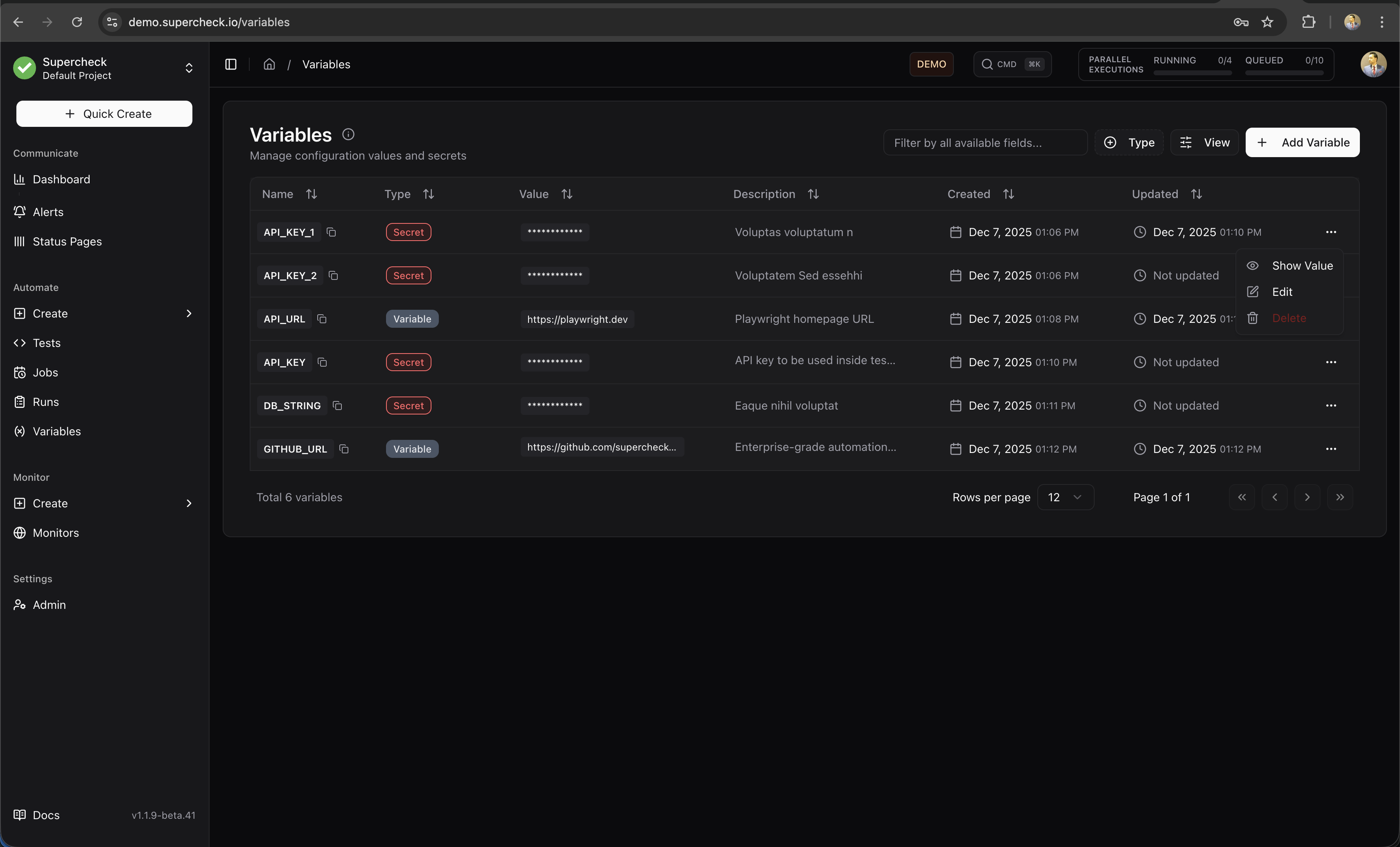
Use file variables for non-sensitive test data and fixtures. Keep passwords, API keys, and tokens in Secrets, not inside uploaded files.
Variables vs Secrets vs Files
- Storage: Plain text
- Visibility: Shown in UI
- Logging: Logged normally
- Use For: URLs, timeouts, feature flags
- Storage: AES-128-GCM encrypted
- Visibility: Masked with
*** - Logging: Avoid intentional logging; execution output is redacted
- Use For: API keys, passwords, tokens
- Storage: S3/MinIO object storage
- Max Size: 5 MB
- Supported Types: CSV, JSON, YAML, XML, TSV, plain text
- Access: Playwright can use
readFile(key); k6 should useopen(getFile(key))in init context - Use For: Test data sets, configuration files, fixtures, parameterized test inputs
Creating Variables
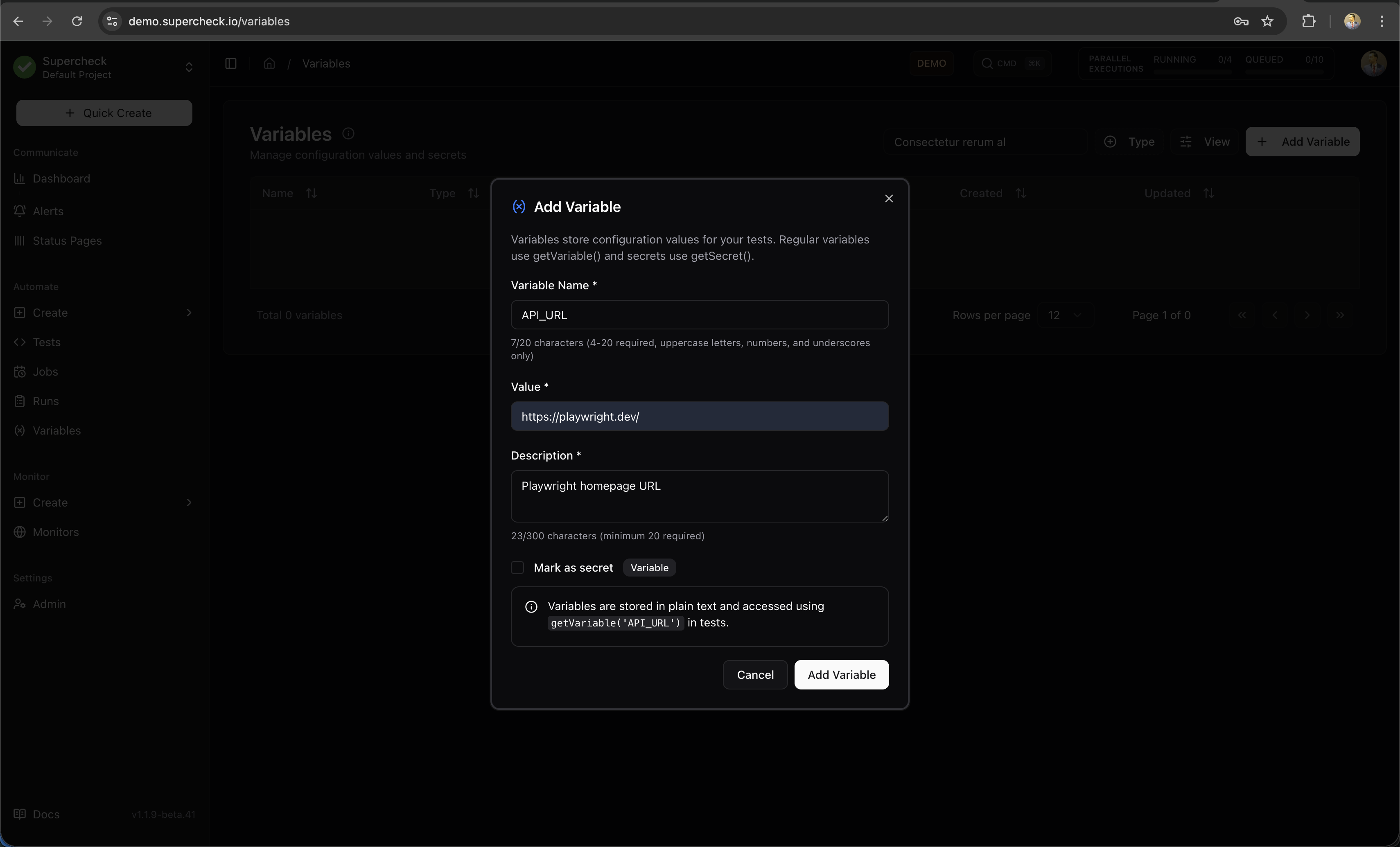
- Go to your project's Variables page
- Click Add Variable
- Select the Variable type (default)
- Enter a key (e.g.,
BASE_URL) - Enter the value (e.g.,
https://staging.example.com) - Optionally add a description for your team
- Click Add Variable
- Go to your project's Variables page
- Click Add Variable
- Select the Secret type from the Type dropdown
- Enter a key (e.g.,
API_KEY) - Enter the value
- Optionally add a description
- Click Add Variable
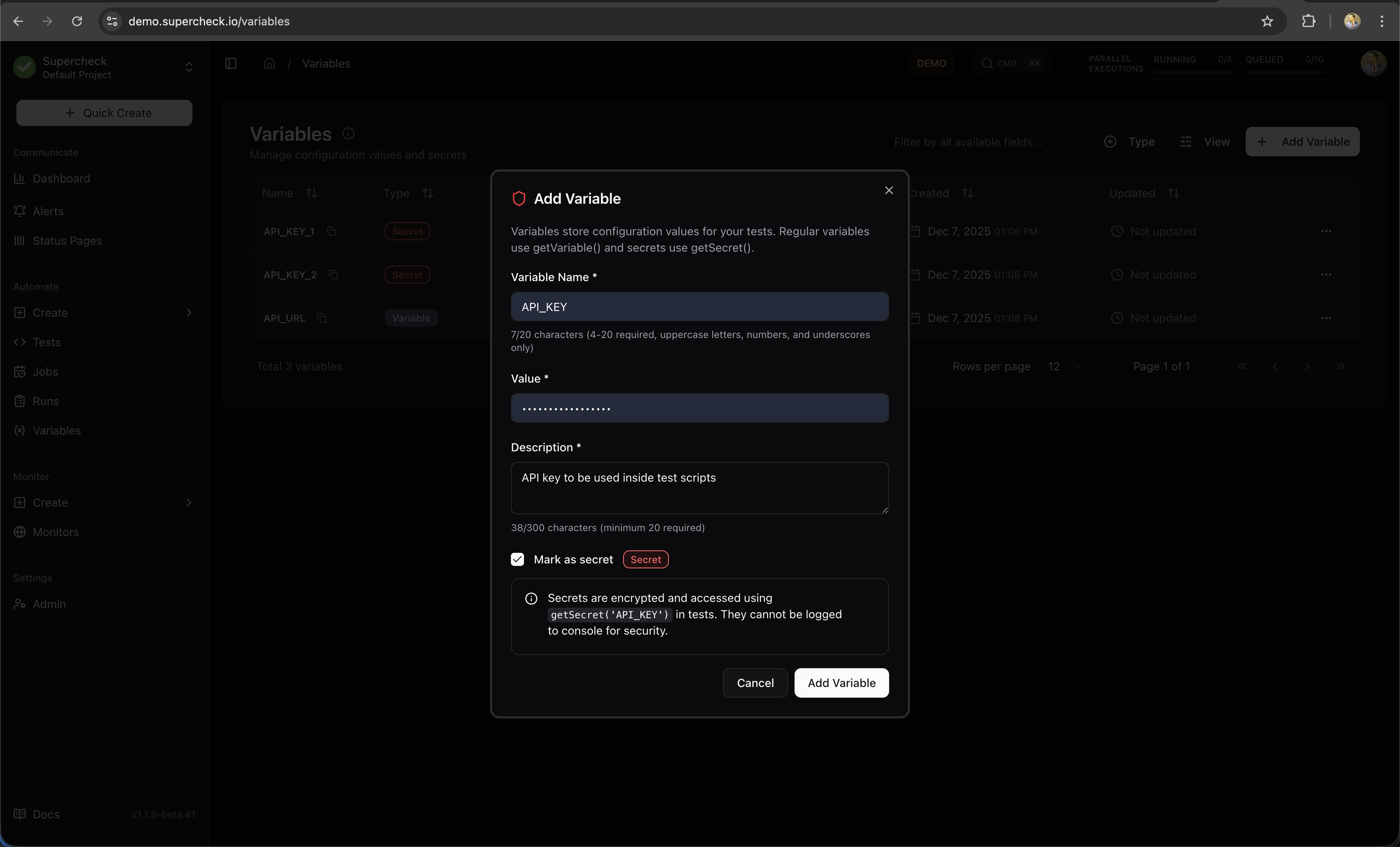
Secret values are masked by default in the UI. Users with secret-view permission can explicitly reveal a value via the dedicated action.
- Go to your project's Variables page
- Click Add Variable
- Select the File type
- Enter a key (e.g.,
TEST_DATA) - Upload a file (CSV, JSON, YAML, XML, TSV, or plain text — max 5 MB)
- Optionally add a description
- Click Add Variable
File variables are stored in S3/MinIO and made available inside the test execution container at runtime. In Playwright, use readFile(key) to read the contents directly. In k6, use open(getFile(key)) during init context, and prefer SharedArray for datasets reused across VUs. To rotate a dataset without changing scripts, keep the same variable key and upload a replacement file.
Using Variables in Tests
Access variables and secrets in your test code using the built-in functions:
Use for non-sensitive configuration:
/**
 * Variables store plain-text configuration values.
 * Use getVariable() to retrieve them in your tests.
 */

// Basic usage
const baseUrl = getVariable('BASE_URL');
const timeout = getVariable('TIMEOUT');

// Navigate using variable
await page.goto(baseUrl + '/login');
Use for sensitive credentials:
/**
 * Secrets are encrypted and resolved at runtime.
 * Secret values are automatically redacted from logs.
 */

// API authentication
const apiKey = getSecret('API_KEY');
await page.setExtraHTTPHeaders({
  'Authorization': `Bearer ${apiKey}`
});

// Form login
const password = getSecret('TEST_PASSWORD');
await page.fill('#password', password);

// Database connection
const dbPassword = getSecret('DB_PASSWORD');
Use in Playwright and other Node.js-based test execution when you want the uploaded file contents as a string:
/**
 * readFile() returns the contents of a file variable directly.
 * This is the simplest option for Playwright fixtures and datasets.
 */
const playwrightCsvContent = readFile('TEST_DATA');

const rows = playwrightCsvContent
  .split('\n')
  .slice(1)
  .filter(Boolean)
  .map((row) => row.split(','));

for (const [name, email] of rows) {
  await page.fill('#name', name);
  await page.fill('#email', email);
}
Use in k6 when you need the resolved file path and want k6 to load the file during init context:
/**
 * File variables are uploaded via the Variables page.
 * k6 should use open(getFile(key)) in init context.
 * Playwright can also call getFile(key) when another helper needs the file path.
 */

// k6
const k6CsvContent = open(getFile('TEST_DATA'));

// Playwright path-based usage
const configPath = getFile('CONFIG_FILE');
readFile() is for Playwright and other Node.js-based execution. k6 does not support readFile(). For k6, always use open(getFile('KEY')) during init context.
Secret Protection
Secrets are resolved at runtime and execution output is redacted before being persisted or returned:
/**
 * Secret values are injected at runtime.
 * The actual values are resolved at runtime.
 */

// Avoid intentional secret logging in scripts
// Worker redaction is an additional protection layer for accidental output
console.log('API key configured:', !!getSecret('API_KEY'));

const actualKey = getSecret('API_KEY');
Secrets work normally in:
- Playwright actions (
page.fill(),page.click()) - HTTP headers and request bodies
- URL parameters
- Comparisons and conditionals
Common Patterns
/**
 * Load environment-specific configuration.
 * Store different URLs for staging vs production.
 */
const env = getVariable('ENVIRONMENT'); // 'staging' or 'production'
const baseUrl = getVariable(`${env.toUpperCase()}_URL`);

await page.goto(baseUrl);
/**
* Authenticated API request using Playwright's request context.
* @see https://playwright.dev/docs/api-testing
*/
const apiUrl = getVariable('API_URL');
const apiToken = getSecret('API_TOKEN');
const apiKey = getSecret('API_KEY');
const response = await request.get(apiUrl + '/users', {
headers: {
'Authorization': `Bearer ${apiToken}`,
'X-API-Key': apiKey
}
});/**
* PostgreSQL database connection with secure credentials.
* @requires pg - PostgreSQL client for Node.js
*/
import { Pool } from 'pg';
const pool = new Pool({
host: getVariable('DB_HOST'),
port: parseInt(getVariable('DB_PORT')),
database: getVariable('DB_NAME'),
user: getVariable('DB_USER'),
password: getSecret('DB_PASSWORD')
});/**
* Conditional test logic based on feature flags.
* Useful for testing different UI versions.
*/
const featureEnabled = getVariable('ENABLE_NEW_CHECKOUT') === 'true';
if (featureEnabled) {
await page.click('[data-testid="new-checkout"]');
} else {
await page.click('[data-testid="classic-checkout"]');
}/**
* Using variables in k6 load tests.
* Variables are injected at runtime.
* For uploaded file datasets, use open(getFile('KEY')) during init context.
* @see https://grafana.com/docs/k6/latest/using-k6/http-requests/
*/
import http from 'k6/http';
export default function () {
const baseUrl = getVariable('API_URL');
const apiKey = getSecret('API_KEY');
http.get(`${baseUrl}/protected`, {
headers: { Authorization: `Bearer ${apiKey}` }
});
}/**
* Playwright data-driven testing using a CSV file variable.
* Upload your test data CSV via Variables page as a file variable.
* For k6, use open(getFile('USER_DATA')) inside SharedArray.
*/
const csv = readFile('USER_DATA');
const users = csv
.split('\n')
.slice(1) // Skip header row
.filter(line => line.trim())
.map(line => {
const [name, email, role] = line.split(',');
return { name, email, role };
});
// Test each user from the data file
for (const user of users) {
await page.goto(getVariable('BASE_URL') + '/admin/users');
await page.click('button:has-text("Add User")');
await page.fill('#name', user.name);
await page.fill('#email', user.email);
await page.selectOption('#role', user.role);
await page.click('button[type="submit"]');
await expect(page.locator('.toast-success')).toBeVisible();
}File Variable Best Practices
- Use file variables for reusable datasets and fixtures, not secrets or credentials
- Keep files small and text-based; split large datasets or generate them dynamically when needed
- Prefer JSON for nested structured data and CSV/TSV for tabular records
- Validate and parse uploaded content defensively before using it in tests
- Avoid logging full dataset contents in CI or shared environments unless you explicitly need that output
Variable Naming Conventions
Use clear, consistent naming for your variables:
| Pattern | Example | Use For |
|---|---|---|
SCREAMING_SNAKE_CASE | BASE_URL, API_KEY | Standard convention |
ENV_SPECIFIC | STAGING_URL, PROD_API_KEY | Environment-specific values |
SERVICE_NAME | STRIPE_API_KEY, SENDGRID_KEY | Third-party service credentials |
Recommended variable names:
| Variable | Description |
|---|---|
BASE_URL | Application base URL |
API_URL | API endpoint base URL |
TIMEOUT | Default timeout in milliseconds |
TEST_USER_EMAIL | Test account email |
TEST_USER_PASSWORD | Test account password (secret) |
API_KEY | API authentication key (secret) |
DB_CONNECTION_STRING | Database connection (secret) |
Security Features
- Secrets are encrypted using AES-128-GCM authenticated encryption (Node.js
crypto) - Encryption keys are derived per-project using HKDF-SHA256
- Values are encrypted at rest in the database
Variables follow your project's role-based permissions:
| Role | View | Create | Edit | Delete | View Secret Values |
|---|---|---|---|---|---|
| Super Admin | ✅ | ✅ | ✅ | ✅ | ✅ |
| Org Owner | ✅ | ✅ | ✅ | ✅ | ✅ |
| Org Admin | ✅ | ✅ | ✅ | ✅ | ✅ |
| Project Admin | ✅ | ✅ | ✅ | ✅ | ✅ |
| Project Editor | ✅ | ✅ | ✅ | ❌ | ✅ |
| Project Viewer | ✅ | ❌ | ❌ | ❌ | ❌ |
All variable operations are logged:
- Who created, updated, or deleted variables
- When changes were made
- Variable keys (not secret values)