
Tests
Create and manage test scriptsEdit
Tests are reusable scripts that validate your application. Create browser, API, database, custom, or performance tests.
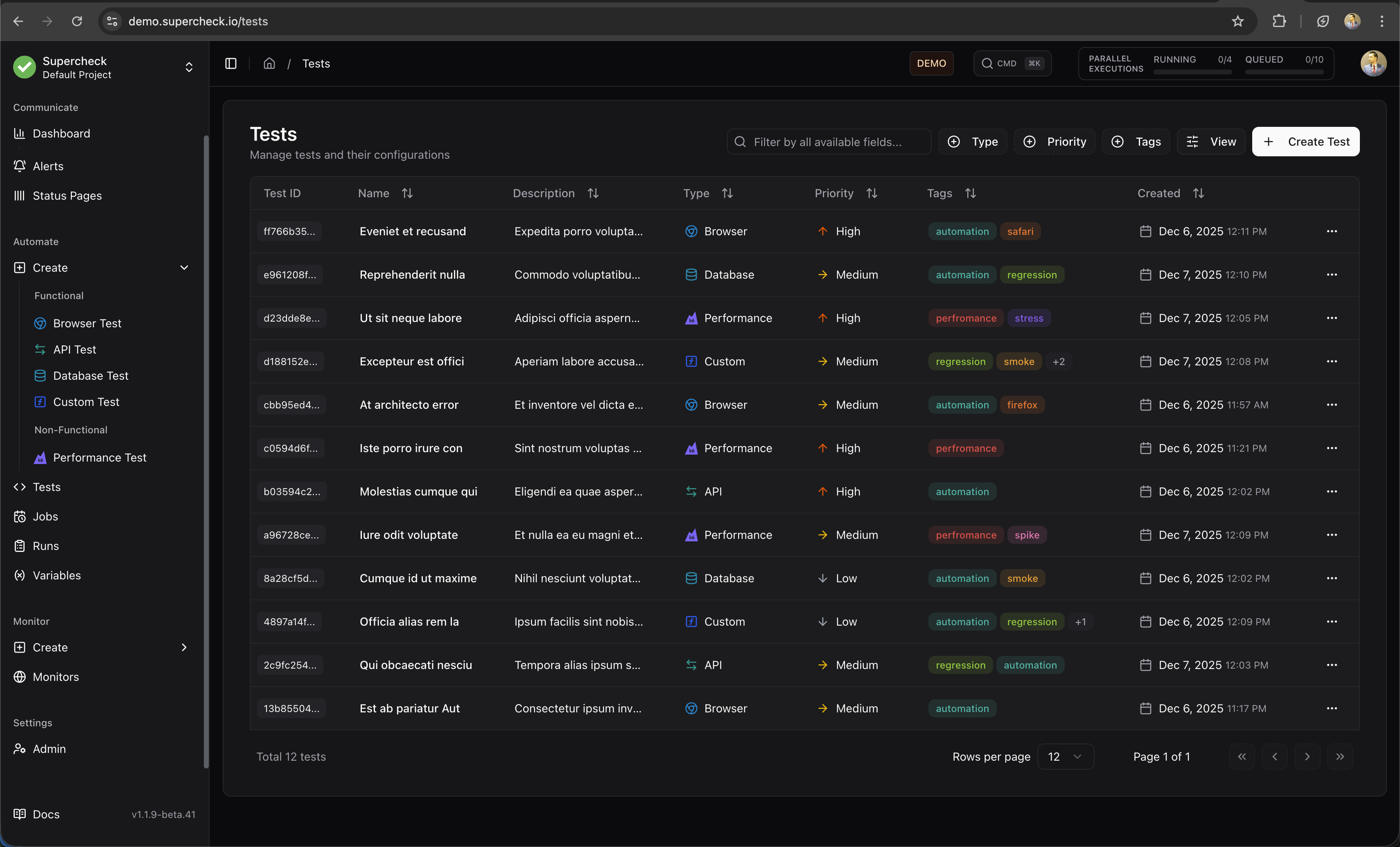
Test Types
Browser Test
Playwright-based UI testing for user flows
API Test
HTTP and GraphQL endpoint validation
Database Test
SQL queries and data validation
Custom Test
Node.js scripts for any scenario
Performance Test
k6 load testing from multiple regions
Create Test
- Go to Create and select test type
- Write script in the Playground
- Use AI Create to generate from natural language
- Use Templates to start with pre-built scripts
- Click Run to validate
- Save when passing
AI Features
- AI Create — Generate tests from plain English descriptions (beta for browser tests)
- AI Fix — Automatically fix failing tests by analyzing errors
- Templates — Pre-built scripts for common scenarios
For browser tests, consider recording with Playwright Codegen first, then use AI to enhance.
See Playground for details.
Test Examples
/**
 * Playwright UI smoke test.
 *
 * Purpose:
 * - Verify that the application loads correctly
 * - Check that critical UI elements are visible
 * - Perform a basic user interaction
 *
 * @see https://playwright.dev/docs/writing-tests
 */
import { expect, test } from '@playwright/test';

const APP_URL = 'https://demo.playwright.dev/todomvc';

test.describe('UI smoke test', () => {
  test('home page renders primary UI', async ({ page }) => {
    // Navigate to the application
    await page.goto(APP_URL);

    // Verify page title and input visibility
    await expect(page).toHaveTitle(/TodoMVC/);
    await expect(page.getByPlaceholder('What needs to be done?')).toBeVisible();

    // Perform interaction: Add a new task
    await page.getByPlaceholder('What needs to be done?').fill('Smoke task');
    await page.keyboard.press('Enter');

    // Verify the task was added to the list
    await expect(page.getByRole('listitem').first()).toContainText('Smoke task');
  });
});/**
* API health probe with contract checks.
*
* Purpose:
* - Verify that the API is up and running (status 200)
* - Check that the response headers are correct (Content-Type)
* - Validate the structure and data types of the response body
*
* @see https://playwright.dev/docs/api-testing
*/
import { expect, test } from '@playwright/test';
const API_URL = 'https://jsonplaceholder.typicode.com';
test.describe('API health check', () => {
test('health endpoint responds with expected payload', async ({ request }) => {
// Send GET request
const response = await request.get(API_URL + '/posts/1');
// Basic status checks
expect(response.ok()).toBeTruthy();
expect(response.status()).toBe(200);
expect(response.headers()['content-type']).toContain('application/json');
// Validate JSON structure
const body = await response.json();
expect(body).toMatchObject({ id: 1 });
expect(typeof body.title).toBe('string');
});
});/**
* k6 smoke test for uptime and latency.
*
* Purpose:
* - Verify system availability (uptime)
* - Check basic latency performance
* - Ensure the system is ready for heavier load tests
*
* Configuration:
* - VUs: 3 virtual users running concurrently
* - Duration: 30 seconds test run
* - Thresholds:
* - Error rate must be < 1%
* - 95th percentile response time must be < 800ms
*
* @see https://grafana.com/docs/k6/latest/using-k6/thresholds/
*/
import http from 'k6/http';
import { check, sleep } from 'k6';
export const options = {
vus: 3, // 3 concurrent users
duration: '30s', // Run for 30 seconds
thresholds: {
http_req_failed: ['rate<0.01'], // Error rate < 1%
http_req_duration: ['p(95)<800'], // 95% of requests < 800ms
},
};
export default function () {
const baseUrl = 'https://test-api.k6.io';
const response = http.get(baseUrl + '/public/crocodiles/1/');
// Validate response
check(response, {
'status is 200': (res) => res.status === 200,
'body is not empty': (res) => res.body && res.body.length > 0,
});
sleep(1); // Pause between requests
}Tags
Organize tests with color-coded tags for easy filtering and categorization.
- Create tags — Add custom tags with any of 8 available colors
- Filter by tags — Quickly find tests by tag in the list view
- Bulk operations — Apply or remove tags from multiple tests
Tags are project-scoped, so each project can have its own tagging system.
Features
- Playground — Interactive editor with AI assistance
- Variables — Project-scoped secrets and config (learn more)
- Reports — Screenshots, traces, and logs
- Tags — Color-coded organization and filtering
- Multi-region — Performance tests from US, EU, APAC
Execution Limits
Playwright Tests: Individual test executions have a maximum runtime of 5 minutes. Tests exceeding this limit are automatically terminated.
K6 Performance Tests: Individual test executions have a maximum runtime of 60 minutes to accommodate load testing scenarios.
Running Multiple Tests
For running multiple tests together in a sequence, use Jobs. Jobs allow you to:
- Group related tests into automated workflows
- Schedule regular execution (hourly, daily, or custom cron)
- Trigger from CI/CD pipelines
- Get aggregated reports and notifications
- Set up alerts for the entire test suite
Jobs are ideal for regression testing, smoke tests, and comprehensive validation of your application.
Learn More
- Playwright Documentation — Browser automation framework
- k6 Documentation — Load testing tool